One link, one pile
Name the request, share it, and keep the files that come back in that inbox.
FileInbox.online
Clients and students upload without an account. You stop collecting files from a messy thread of email attachments.
They open the link and upload. They do not create an account, and they do not confirm an email.
The Free plan can be used ongoing. Paid plans include one month free to try, with no card charge during that month. Files are encrypted on our disk. A person reads [email protected].
They open the link and upload. They do not create an account, and they do not confirm an email.
Turn either on when the inbox needs a limit. You can copy the password and send it with the link.
Files are encrypted on our disk.
The Free plan stays free. Basic and Professional include one month free to try. No card charge during that month.
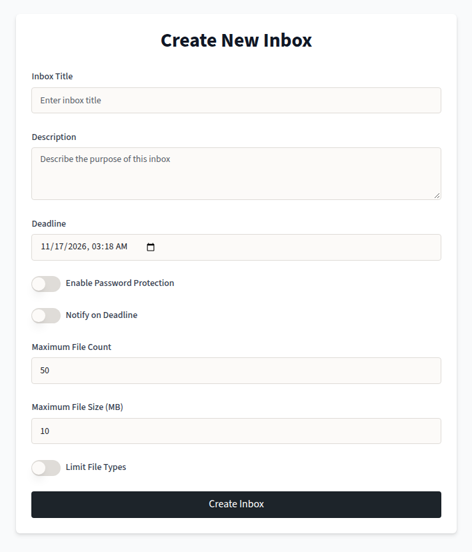
Name the request, share it, and keep the files that come back in that inbox.
Basic and Professional can email you when someone uploads. The Free plan does not.
You can password-protect an inbox. Files are stored encrypted on our disk.
FileInbox.online is a lightweight way to collect files with a link. People upload into an inbox you control. We do not offer an API, and we do not sync those files with Dropbox or Google Drive. fileinbox.com is a different product.
Collect files with a file request linkFileInbox.online is not fileinbox.comCollect homeworkCollect design proofsCollect vendor documents
School homework, design proofs, and vendor documents are the same job: send a link, and the files land in the inbox.
School
A teacher posts one link. Students upload the assignment before the deadline, instead of dropping files named final_final2 into a class chat.
Design
A designer asks a client for logos, fonts, and reference photos. They land in one inbox, not a messy thread.
Vendors
A small team collects contracts, invoices, and delivery photos from suppliers. Add a password when the files should not be public, then download them from the inbox.
Create an inbox, share the link, and collect files from coworkers, clients, or a class.
People you ask can upload with the link alone. They do not create a FileInbox.online account.
Each plan has a file-size limit. It is meant for the files that bounce out of email, not for unlimited storage.
Submissions sit together. Download them from the inbox, including a zip on paid plans.
Each file shows its name and the time it was submitted. Paid plans can also email you when something arrives.
Name it, write what you need, and set a deadline. Add a password if the link should not be open.
Send it by email, a class page, or a message. If you set a password, send that too.
They open the link and send files. They do not create an account.
Open the inbox and download the files. Paid plans can download them together as a zip.
Short answers about a FileInbox.online file request link, including no account to upload, plans, and where the files sit.
You create an inbox on FileInbox.online and share a file request link. Other people upload into that inbox. They do not need an account.
✔️ A link for each collection
✔️ A name, a description, a deadline, and an optional password
✔️ Email when a file arrives (Basic and Professional)
✔️ Files stored encrypted on our disk
No. Anyone with the link can upload. They only see the upload page for that inbox, not your other inboxes.
You can put a password on the inbox and set a deadline. Share the password yourself — it stays visible to you so you can copy it to the people who should upload.
A deadline closes new uploads.
The terms do not promise how many days files remain after a deadline or after an account is closed.
Paid plans include one month free to try, with no card charge during that month.
There are three plans. Limits below match the pricing cards. Paid plans can be tried free for one month. We do not charge during this trial.
✔️ Free Plan: $0 per month, 500MB total storage, up to 2 inboxes, up to 50 files per inbox, up to 50MB per file, 100MB storage per inbox. Batch download, email notify, and ticket support are not included.
✔️ Basic Plan: $5 per month, 10GB total storage, up to 10 inboxes, up to 500 files per inbox, up to 500MB per file, 1GB storage per inbox. Includes batch download, email notify, and ticket support.
✔️ Professional Plan: $15 per month, 50GB total storage, up to 999 inboxes, up to 5000 files per inbox, up to 1GB per file, 5GB storage per inbox. Includes batch download, email notify, and ticket support.
You can move up or down during an active trial. The free plan does not include every paid feature.
Paid plans include one month free to try, with no card charge during that month. That month is not a limited-time discount on top of the listed price.
The monthly prices on the cards are the listed plan prices. Basic is $5 per month. Professional is $15 per month. You can move between plans.
Open Sign in and choose the sign-up tab. Use your email and a password, or continue with Google if that option is shown.
After you are in, create an inbox and share the link.
Log in and open Settings from your account menu to update your profile and account details.
Paid plans include one month free to try, with no card charge during that month. You can move between plans. Basic is listed at $5 per month and Professional at $15 per month.
Email [email protected].
We try to reply within one business day.
The Free plan can be used ongoing. Paid plans include one month free to try, with no card charge during that month. You can move between plans.
FileInbox.online is for collecting files from other people. You share a link. They upload. This is not a way to send one of your files out, and it is not a shared folder that asks them to sign up. The person uploading needs no account.
The Free plan stays free. Basic is listed at $5 per month and Professional at $15 per month. Those are the prices on the cards below. Paid plans include one month free to try, with no card charge during that month. You can move between plans.
On the Free plan, open the inbox to see new files. Email notice and a zip download start on Basic ($5).
For a couple of inboxes
Free
/month
For regular client work
$5
/month
For a full class or client load
$15
/month
Questions about an inbox, a deadline, or a plan — email FileInbox.online. A person reads [email protected]. We try to reply within one business day.
Email supportTell us the inbox link if you have one, what you expected, and what happened instead. If the question is about storage or how many inboxes you can open, say whether you are on the Free plan or trying Basic ($5) or Professional ($15).
Use it for help with a file request link, a password you need to copy to an uploader, a deadline, or a paid plan. The Free plan stays free. Paid plans include one month free to try, with no card charge during that month.
This page does not accept file uploads. To collect files, create an inbox and share that link. The uploader needs no account. Files are stored encrypted on our disk and are for the inbox owner.
We do not offer an API, and we do not sync an inbox to Dropbox or Google Drive. Email is the support channel on this site.